


How do anglers take photos holding the fish when fishing alone??

In reply to Post #1
Phone on a tripod, with the phone in video mode and the screen set so you can see yourself.
Then just take out the stills that you want.
Phone on a tripod, with the phone in video mode and the screen set so you can see yourself.
Then just take out the stills that you want.

In reply to Post #1
Exactly the same as in post 2 except I converted a car phone holder to use on a bank stick just less to carry ,but you can also buy a Bluetooth remote off eBay for a few quid not sure what phone you have but they deffinatly work on android
Exactly the same as in post 2 except I converted a car phone holder to use on a bank stick just less to carry ,but you can also buy a Bluetooth remote off eBay for a few quid not sure what phone you have but they deffinatly work on android
I take pics with my iPhone 13 Pro (plenty good enough for catch shots imo) and with that I use something like this: Tripod
I then put that on a bucket and adjust as needed. You can then either use the supplied remote to trigger the camera, or - and this is what I do and it is flawless - use voice control on my iPhone to take pictures. The command for iPhone is linked to the "Accessibility" services and so I have to say "turn volume down" to trigger the shutter but it never fails, unlike some 3rd party voice controlled apps that I have used.
I then put that on a bucket and adjust as needed. You can then either use the supplied remote to trigger the camera, or - and this is what I do and it is flawless - use voice control on my iPhone to take pictures. The command for iPhone is linked to the "Accessibility" services and so I have to say "turn volume down" to trigger the shutter but it never fails, unlike some 3rd party voice controlled apps that I have used.

In reply to Post #1
Same tripod and method as #4 except I have a Samsung 22 Android phone and the voice command is also built into the settings (just have to activate it in settings) which it has been on Samsung phones for years I have the camera screen facing me with the front camera lens activated and just say smile a little timer which is about 3 seconds starts counting down from the second you say smile,cheese,dickhead etc...
Same tripod and method as #4 except I have a Samsung 22 Android phone and the voice command is also built into the settings (just have to activate it in settings) which it has been on Samsung phones for years I have the camera screen facing me with the front camera lens activated and just say smile a little timer which is about 3 seconds starts counting down from the second you say smile,cheese,dickhead etc...

iPhone set on Portrait mode, bank stick, Rhino Snap phone holder and wolf bluetooth remote. I also have a rhino beam that slots on top of the phone holder for night shots.
Camera on tripod using intervalometer settings.
Use an intervalometer or a release you can trigger with your knee

In reply to Post #1
I use the Rhino Click.
Absolutely spot on.
I use the Rhino Click.
Absolutely spot on.
In reply to Post #9
I like that. Just ordered one
I like that. Just ordered one

In reply to Post #9
How does that work with a decent size fish. Cant wrap my head around how you would get your thumb to index finger with any half decent width fish?
Like others before tripod and phone. Any half decent new phone does face or voice recognition. I just look at my fold 4 and say shoot and takes stills on demand. Works great
How does that work with a decent size fish. Cant wrap my head around how you would get your thumb to index finger with any half decent width fish?
Like others before tripod and phone. Any half decent new phone does face or voice recognition. I just look at my fold 4 and say shoot and takes stills on demand. Works great
In reply to Post #12
Watched that video but still doesn't explain if you have a half decent fish with some width on him how you get your thumb across whilst holding the fish. He also doesn't show it in action.
Reading the comments in that video seems im not the only one thinking it's a lot of hassle lol. But each their own what ever works 👍
Watched that video but still doesn't explain if you have a half decent fish with some width on him how you get your thumb across whilst holding the fish. He also doesn't show it in action.
Reading the comments in that video seems im not the only one thinking it's a lot of hassle lol. But each their own what ever works 👍
In reply to Post #13
I just like gadgets
I just like gadgets
In reply to Post #14
In truth so do I. Researching the ring did make me spend £32 as i saw the Rhino Beam Beam V5 and instantly bought it
In truth so do I. Researching the ring did make me spend £32 as i saw the Rhino Beam Beam V5 and instantly bought it
In reply to Post #13
i thought that how do u press it when your hands are full !
i thought that how do u press it when your hands are full !
I use similar to post #2 and use a free app “Frame Grab” to scroll through the video and copy the best frame.

In reply to Post #1
phone on tripod, set up to take good quality photos in portrait mode, the app "Auto clicker" set to take photos at 3 second intervals, pick a couple of good photos out and delete the rest.
phone on tripod, set up to take good quality photos in portrait mode, the app "Auto clicker" set to take photos at 3 second intervals, pick a couple of good photos out and delete the rest.

I use my phone these days
but my method was similar when using a top end digital camera
I used to get my tripod set up the camera in the doorway ( in case it rained ) then get the mat kneel in front of with arms up like I was holding a fish take a couple of test shots adjusting the distance until it was framed perfectly then peg the mat so it could not be moved
then I could store the tripod at the back of the bivvy until needed
today I use a MOB and a bankstick holder and just shout cheese and my Samsung takes the picture easy peasy
but my method was similar when using a top end digital camera
I used to get my tripod set up the camera in the doorway ( in case it rained ) then get the mat kneel in front of with arms up like I was holding a fish take a couple of test shots adjusting the distance until it was framed perfectly then peg the mat so it could not be moved
then I could store the tripod at the back of the bivvy until needed
today I use a MOB and a bankstick holder and just shout cheese and my Samsung takes the picture easy peasy
App phototimer + is another one that takes multiple self timed pics
I just use a samsung galaxy s20fe with open camera or voice selfie on a tripod with a phone (selfie) holder (about £3 on amazon).
Takes great pictures
Takes great pictures

If using a android, pop onto a mini tripod with screen facing you, get into position and just say "hey google, take a selfie" no need for timers or remotes then. 

In reply to Post #22
so.thats using the selfie camera that isn't anywhere near as good as the main camera?
so.thats using the selfie camera that isn't anywhere near as good as the main camera?
In reply to Post #23
i have no complaints with the selfie sensor on the Oppo X5 - just trying to help mate, will keep my mouth shut next time
If using a DSLR, id use the Rhino Pedal - but that info is probally wrong too
i have no complaints with the selfie sensor on the Oppo X5 - just trying to help mate, will keep my mouth shut next time
If using a DSLR, id use the Rhino Pedal - but that info is probally wrong too

If I get myself organised I'll usually setup the DSLR with an intervolometer.
But last night I was so unorganised I just used my phone, selfie facing and videoed the fish.
The shots in the June Catch Report are screenshots from the video.
My selfie facing camera on my phone (Oppo Reno8) is 32 mb.
My DSLR is only 12mb (I know lenses come into it etc..) the shots are good enough for me.
Couple of weeks ago I had a 30lb Common. Someone was there to take pics so I got them to do some with the DSLR and some with the phone. Normal camera on phone is 52mb, the difference was night and day. The phone won hands down.
So from now on I don't think I will bother with the DSLR and just use my phone.
All about what YOU want I suppose. Insta and posting on here phones are more than adequate imo.
But last night I was so unorganised I just used my phone, selfie facing and videoed the fish.
The shots in the June Catch Report are screenshots from the video.
My selfie facing camera on my phone (Oppo Reno8) is 32 mb.
My DSLR is only 12mb (I know lenses come into it etc..) the shots are good enough for me.
Couple of weeks ago I had a 30lb Common. Someone was there to take pics so I got them to do some with the DSLR and some with the phone. Normal camera on phone is 52mb, the difference was night and day. The phone won hands down.
So from now on I don't think I will bother with the DSLR and just use my phone.
All about what YOU want I suppose. Insta and posting on here phones are more than adequate imo.

In reply to Post #4
If it's the same as iPhone 12 you can say ‘hey Siri, turn on voice control', ‘open camera' and ‘show names'. This will label all the camera functions, to take a photo you just say ‘tap take picture'.
Not that it really matters if you've got it sorted anyway, but there is proper voice control of the camera.
If it's the same as iPhone 12 you can say ‘hey Siri, turn on voice control', ‘open camera' and ‘show names'. This will label all the camera functions, to take a photo you just say ‘tap take picture'.
Not that it really matters if you've got it sorted anyway, but there is proper voice control of the camera.
In reply to Post #26
The controls must be slightly different - it's the volume down button that normally acts as the shutter button for the camera on this model, so I'm just telling the phone to activate that button when I say so. I have to turn on voice control from the accessibility menu, which probably has the same end result as you using Siri. What I have learned, though, is turn off the voice control once I'm finished because the phone is unusable otherwise!
The controls must be slightly different - it's the volume down button that normally acts as the shutter button for the camera on this model, so I'm just telling the phone to activate that button when I say so. I have to turn on voice control from the accessibility menu, which probably has the same end result as you using Siri. What I have learned, though, is turn off the voice control once I'm finished because the phone is unusable otherwise!
In reply to Post #26
Thank you. Ive had every model of iphone since the 4S and I never knew you could do that.
I guess im not what they call a 'power user' lol
bye bye soppy bluetooth reemote.
nice one
Thank you. Ive had every model of iphone since the 4S and I never knew you could do that.
I guess im not what they call a 'power user' lol
bye bye soppy bluetooth reemote.
nice one

Photo timer + is very good also. Set the amount of pictures and delay between shots.

Anyone with an iPhone look at Lens Buddy app lets you shot in portrait mode plus has custom timer , set delay inbetween shots and takes as many shots as u like slightly better version than the Photo timer + app due to being able to shot in portrait mode
In reply to Post #30
I'll check that meself thank you. Self take using the app. First light picture
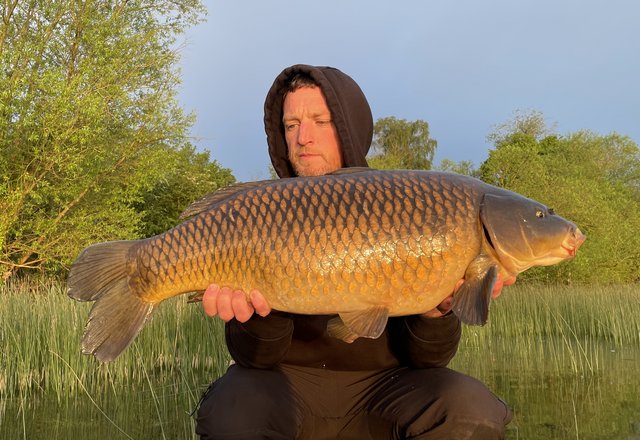
I'll check that meself thank you. Self take using the app. First light picture
In reply to Post #1
I have a Samsung A52 which is by no means the best phone on the market, but I have set up the camera to take shots on the word "cheese". Works very well on a cheap tripod and a £2.99 phone holder.
I have a Samsung A52 which is by no means the best phone on the market, but I have set up the camera to take shots on the word "cheese". Works very well on a cheap tripod and a £2.99 phone holder.

In reply to Post #32
I use the “hey camera” app with my phone. You just say cheese and it takes a pic. Found it more reliable than the Siri commands.
I use the “hey camera” app with my phone. You just say cheese and it takes a pic. Found it more reliable than the Siri commands.
I use hey camera with an iphone 11 and it works great. Just have to say photo or video and it does it all
In reply to Post #34
You can't use portrait mode with hey camera though, and I use that all the time. Voice control works absolutely perfectly for me all of the time.
You can't use portrait mode with hey camera though, and I use that all the time. Voice control works absolutely perfectly for me all of the time.
In reply to Post #35
TBH I always take them landscape and crop them later, so it's not an issue.
Maybe I don't talk proper for Siri like
TBH I always take them landscape and crop them later, so it's not an issue.
Maybe I don't talk proper for Siri like
In reply to Post #36
Yeah I take them in landscape, I mean portrait mode which blurs the background You're stuck in normal photo mode with hey camera if I remember rightly (I've used it myself).
Yeah I take them in landscape, I mean portrait mode which blurs the background
You're stuck in normal photo mode with hey camera if I remember rightly (I've used it myself).

Prefer to use the rear camera on my phone, better quality snaps but not quite as easy as a selfie....
Leave the fish in the net, set up the phone on a tripod facing me and the unhooking mat, frame the shot with the forward facing camera allowing for a bit of space around the edges for error. Turn the camera around, get the fish out, use the voice activation feature on my Samsung, (say "smile") fire off a few of each side then crop afterwards. Helps if you turn up the volume on the camera so that you can hear the "click" to be certain the phone has taken a shot.
The other thing i tried was a small, round selfie mirror stuck to the back of the phone case, you can pick them up on eBay for a couple of quid. If positioned correctly and you can see yourself in the mirror then you will be framed OK....doesn't work so well at night though!
Leave the fish in the net, set up the phone on a tripod facing me and the unhooking mat, frame the shot with the forward facing camera allowing for a bit of space around the edges for error. Turn the camera around, get the fish out, use the voice activation feature on my Samsung, (say "smile") fire off a few of each side then crop afterwards. Helps if you turn up the volume on the camera so that you can hear the "click" to be certain the phone has taken a shot.
The other thing i tried was a small, round selfie mirror stuck to the back of the phone case, you can pick them up on eBay for a couple of quid. If positioned correctly and you can see yourself in the mirror then you will be framed OK....doesn't work so well at night though!

In reply to Post #1
I use my phone and an app called "take my picture"
I use my phone and an app called "take my picture"
I prefer to do things the old school way. Just got myself a remote peddle from Rhino.
Canon 750d. L series 24-105. Flip screen obviously facing me. Couple of Rhino lights illuminating me. My night shots are excellent if I do say so myself 😂So easy.
Canon 750d. L series 24-105. Flip screen obviously facing me. Couple of Rhino lights illuminating me. My night shots are excellent if I do say so myself 😂So easy.

In reply to Post #40
I still use the air bulb release system 👍
I still use the air bulb release system 👍

In reply to Post #1
When I get to the swim I work out where I want to do my pictures, so everything is easy to get ready.
I don't use distance sticks, I have my spare bivvy storm sticks which double or triple up as dog lead spike, and camera/phone sticks.
At night I resort to the camera and flash on a Gardner camera adaptor on the bankstick. I'm still going self timer if I'm on my own, but as said everything is planned for, position, height etc.
During the day I usually use my phone, I have a Samsung phone holder that screws onto the camera adapter.
Easy enough to say 'picture' or whatever to get the screen camera pic.
When I get to the swim I work out where I want to do my pictures, so everything is easy to get ready.
I don't use distance sticks, I have my spare bivvy storm sticks which double or triple up as dog lead spike, and camera/phone sticks.
At night I resort to the camera and flash on a Gardner camera adaptor on the bankstick. I'm still going self timer if I'm on my own, but as said everything is planned for, position, height etc.
During the day I usually use my phone, I have a Samsung phone holder that screws onto the camera adapter.
Easy enough to say 'picture' or whatever to get the screen camera pic.

I am at the stage now where every single fish I catch gets self takes. Pike, barbel, carp, it does not matter which. If I catch a momentous fish, the chances are I will produce far better photographs than trusting someone else with my camera. I use a Nikon SLR, only a cheap one, with a really good 30mm lens. My iPhone gets used for video. I got a cheap tripod for camera and iPhone from eBay.
Best tip anyone has ever given me, was Terry Hearn telling me to get an intervalometer from eBay for my camera. Amazing bits of kit. Don't ask me how to set it up, Terry told me over the phone and it has been set ever since. That was seven years ago. It still has the same battery in it, despite me carrying spares. It only cost me around 35 notes.
Mine is set to take 50 shots, one a second, starting 30 seconds after I press the button.
I set my Cotswold Le Graviers mat up first in the right position, whilst the fish is still in the net or sack. Two buckets for the camera and phone. Then I simply set the camera and the video, framed to the cradle mat. It's so very simple. It could not be any easier. That unhooking mat does not move. I bring fish to the mat, sort it out and remove sack or net. Add some water. Seal the top of the cradle mat up, securing the fish safely. Quickly get the video running, and then press the intervalometer which is sitting down next to the mat. I have a dog bowl full of water hidden behind the mat. I now have thirty seconds to pick fish up and get into position. Lots of time. Video is edited later, photo's come out spot on every time, although I will always air on the side of caution and then slightly crop.
It's so easy. It never gets messed up by someone else. For me personally, there is NOTHING worse than having an over excited carp angler with me when I have a big fish on the mat. I would rather be alone on my own and calm. But everyone is different. Whatever is best for the fish is always the most important part of the equation. If that means having two anglers to help you, then have two anglers to help you.
Best tip anyone has ever given me, was Terry Hearn telling me to get an intervalometer from eBay for my camera. Amazing bits of kit. Don't ask me how to set it up, Terry told me over the phone and it has been set ever since. That was seven years ago. It still has the same battery in it, despite me carrying spares. It only cost me around 35 notes.
Mine is set to take 50 shots, one a second, starting 30 seconds after I press the button.
I set my Cotswold Le Graviers mat up first in the right position, whilst the fish is still in the net or sack. Two buckets for the camera and phone. Then I simply set the camera and the video, framed to the cradle mat. It's so very simple. It could not be any easier. That unhooking mat does not move. I bring fish to the mat, sort it out and remove sack or net. Add some water. Seal the top of the cradle mat up, securing the fish safely. Quickly get the video running, and then press the intervalometer which is sitting down next to the mat. I have a dog bowl full of water hidden behind the mat. I now have thirty seconds to pick fish up and get into position. Lots of time. Video is edited later, photo's come out spot on every time, although I will always air on the side of caution and then slightly crop.
It's so easy. It never gets messed up by someone else. For me personally, there is NOTHING worse than having an over excited carp angler with me when I have a big fish on the mat. I would rather be alone on my own and calm. But everyone is different. Whatever is best for the fish is always the most important part of the equation. If that means having two anglers to help you, then have two anglers to help you.
In reply to Post #38
Search for Unlanzi ST-30 phone mount on Ali express website or Google it it has Small mirror on the top of the mount allows you to angle the mirror to the phone front screen so you can see what the rear camera is seeing
Search for Unlanzi ST-30 phone mount on Ali express website or Google it it has Small mirror on the top of the mount allows you to angle the mirror to the phone front screen so you can see what the rear camera is seeing
In reply to Post #43
Do you do many night shots with those settings?
Do you do many night shots with those settings?
In reply to Post #45
It's no different. The settings I speak of are on the gadget controlling the camera shutter taking shots, nothing to do with the settings of the camera itself mate. In daylight I shoot in A, Aperture priority I think it is. It refocuses after every shot.
At night add one of those Rhino lights or similar and change camera settings to auto.
Tinpot set the settings on my Nikon SLR body the day I got it & they have never been changed ever since either.
Although to be fair, on the Thames all carp big or small always get sacked until 9am to avoid spooking the rest of shoal to catch more.... And lakes I tend to fish it's a momentous occasion when one gets caught so they normally get sacked too if worthy of a proper photo. I do not believe in floating retainers and never have. The most stupid invention for carp fishing ever. Over engineering something to solve problems that were never there. I believe they actually create unnecessary problems holding a carp up in the surface layers. They are always agitated. I will only use one if made too by silly lake rules. A net is no good for long periods either they just go crazy trying to escape! If a carp is ever retained, it should be on the bottom, with its eyes covered to keep it calm. You know, a carp sack... Not in a floating retainer up on the surface, not in a landing net.
That's a brace of Burghfield 42lb+, waiting to be photographed. Both were caught in daylight. First one got sacked. As they do, Sat on surface for a minute. Then went to bottom where she never moved again. The fish in sack on right has just been put there. Up on surface for one minute dispelling air via bubbles, then she will sink to bottom, relax and never move again until I remove her when some one arrives to do photos. If they were in retainers, they would be held up on surface against their will, rocking in the waves and constantly agitated.
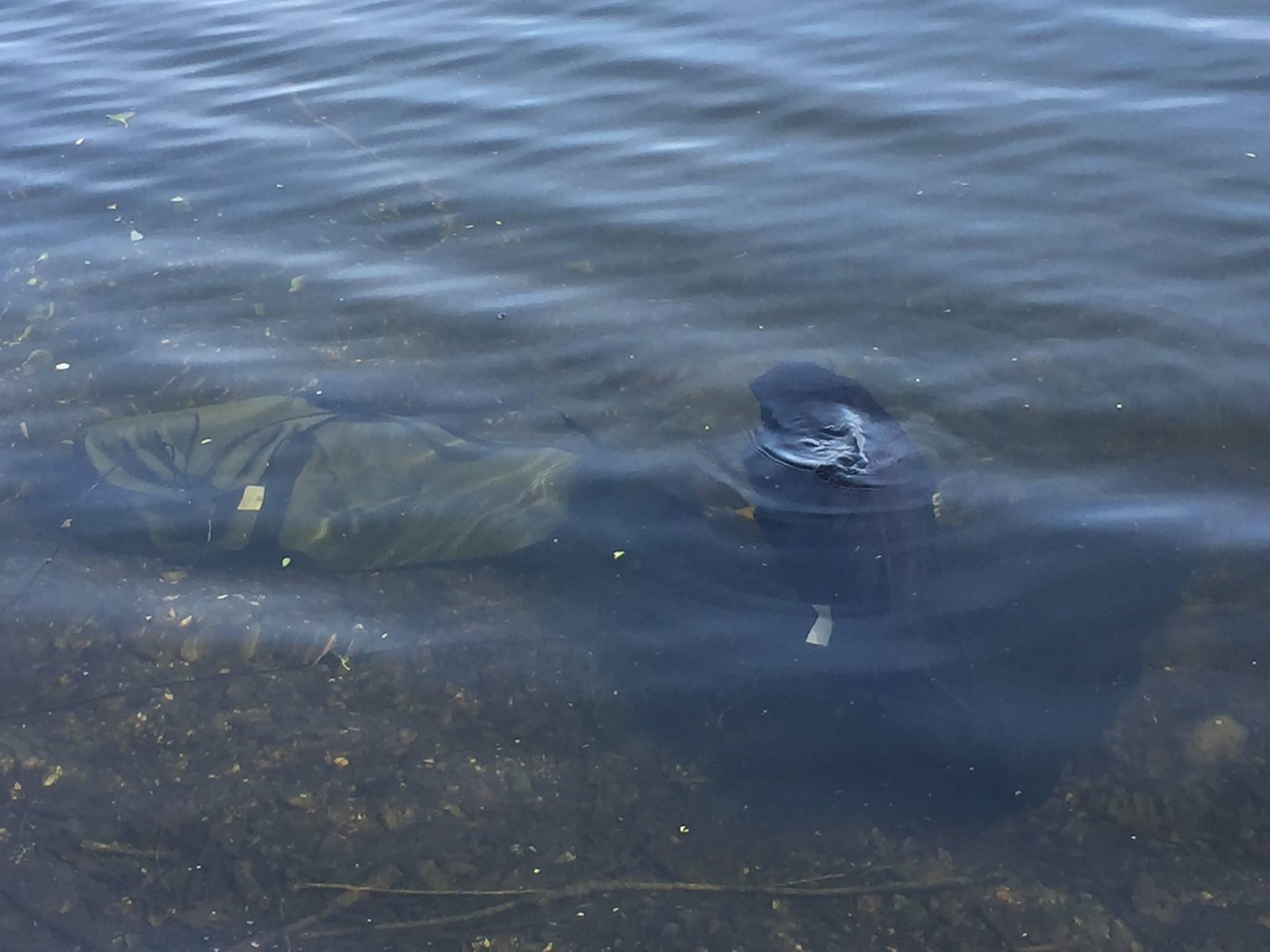
It's no different. The settings I speak of are on the gadget controlling the camera shutter taking shots, nothing to do with the settings of the camera itself mate. In daylight I shoot in A, Aperture priority I think it is. It refocuses after every shot.
At night add one of those Rhino lights or similar and change camera settings to auto.
Tinpot set the settings on my Nikon SLR body the day I got it & they have never been changed ever since either.
Although to be fair, on the Thames all carp big or small always get sacked until 9am to avoid spooking the rest of shoal to catch more.... And lakes I tend to fish it's a momentous occasion when one gets caught so they normally get sacked too if worthy of a proper photo. I do not believe in floating retainers and never have. The most stupid invention for carp fishing ever. Over engineering something to solve problems that were never there. I believe they actually create unnecessary problems holding a carp up in the surface layers. They are always agitated. I will only use one if made too by silly lake rules. A net is no good for long periods either they just go crazy trying to escape! If a carp is ever retained, it should be on the bottom, with its eyes covered to keep it calm. You know, a carp sack... Not in a floating retainer up on the surface, not in a landing net.
That's a brace of Burghfield 42lb+, waiting to be photographed. Both were caught in daylight. First one got sacked. As they do, Sat on surface for a minute. Then went to bottom where she never moved again. The fish in sack on right has just been put there. Up on surface for one minute dispelling air via bubbles, then she will sink to bottom, relax and never move again until I remove her when some one arrives to do photos. If they were in retainers, they would be held up on surface against their will, rocking in the waves and constantly agitated.
In reply to Post #1
Tripod with a decent phone camera, most have voice activation now, which makes it easier.
Net fish, set up mat and tripod, photo / video and return the fish.
You can put fish in a retainer, the idea being that it's slightly better in some situations than to leave them in the net.
Most lake rules will allow you to 'retain' a fish while you sort out your camera etc. These are not meant to be left out all night with the fish in.
Majority of lakes nowadays wont allow you sack fish overnight anymore and tbh with all the decent equipment for a good photo there's no real need to.
Tripod with a decent phone camera, most have voice activation now, which makes it easier.
Net fish, set up mat and tripod, photo / video and return the fish.
You can put fish in a retainer, the idea being that it's slightly better in some situations than to leave them in the net.
Most lake rules will allow you to 'retain' a fish while you sort out your camera etc. These are not meant to be left out all night with the fish in.
Majority of lakes nowadays wont allow you sack fish overnight anymore and tbh with all the decent equipment for a good photo there's no real need to.

In reply to Post #1
I just set my phone up on a bucket against a mug or something , make sure mat is in picture and it looks ok and when I get a fish, open camera up and just say "capture ". Not sure why people need apps, the phones do it all these days. Work at night also with flash on. Good enough for a picture of a fish IMO
I just set my phone up on a bucket against a mug or something , make sure mat is in picture and it looks ok and when I get a fish, open camera up and just say "capture ". Not sure why people need apps, the phones do it all these days. Work at night also with flash on. Good enough for a picture of a fish IMO
In reply to Post #43
hi may i ask with my android phone how do i get the settings on the phone right to do a video of the capture with a delay ,or can you send me to the right place please i will also need to no how to get the best photos from the video i tried on you tube but cant find the correct info -thanks
hi may i ask with my android phone how do i get the settings on the phone right to do a video of the capture with a delay ,or can you send me to the right place please i will also need to no how to get the best photos from the video i tried on you tube but cant find the correct info -thanks
In reply to Post #43
hi may i ask with my android phone how do i get the settings on the phone right to do a video of the capture with a delay ,or can you send me to the right place please i will also need to no how to get the best photos from the video i tried on you tube but cant find the correct info -thanks
hi may i ask with my android phone how do i get the settings on the phone right to do a video of the capture with a delay ,or can you send me to the right place please i will also need to no how to get the best photos from the video i tried on you tube but cant find the correct info -thanks
In reply to Post #50
are youtube
links ok here
are youtube
links ok here

In reply to Post #50
Why do you need a delay for a video?
You're never going to get a good result taking a still from a video, you might get something adequate if you aren't too fussy, but it's never going to be good
Why do you need a delay for a video?
You're never going to get a good result taking a still from a video, you might get something adequate if you aren't too fussy, but it's never going to be good
Reading ALL pages