


In reply to Post #45
I'm going to bed, early night tonight...will check it out on old site tomorrow as you'll no doubt remind me!
Thanks for feedback / help testing etc today, to you and to others 👍 🙏
I'm going to bed, early night tonight...will check it out on old site tomorrow as you'll no doubt remind me!
Thanks for feedback / help testing etc today, to you and to others 👍 🙏

Well done Karlos, looks and works decent 👌.
Now this is done and there's been a bit of rain, you should get down the river for a few 😀
Now this is done and there's been a bit of rain, you should get down the river for a few 😀

I seem to have lost all my pm

In reply to Post #48
You can see them on the old version of the site
LINKY POO™ https://old.carpforum.co.uk/Shared/Forums.asp
You can see them on the old version of the site
LINKY POO™ https://old.carpforum.co.uk/Shared/Forums.asp
I have put some help text at the top of the PM page to direct users to the old site and old PMs.
Hope that helps.
So as not to annoy 'converts' to the new PM system I have made the 'info card' collapsible to get it out of the way once you've read it.
I can remove the 'info card' fully in the future, once people are all over onto the new system 👍
Hope that helps.
So as not to annoy 'converts' to the new PM system I have made the 'info card' collapsible to get it out of the way once you've read it.
I can remove the 'info card' fully in the future, once people are all over onto the new system 👍

Is the search function capable of searching within posts rather than just thread titles, that was quite handy?

In reply to Post #51
It used to be, but not sure that its still possible?????
It used to be, but not sure that its still possible?????
In reply to Post #51
If you use the main "search the forum" box right at the top of the screen it definitely searches in posted comments of threads rather than just the titles that the little box at the top of the thread section seems to do. This smaller box to be fair is called "search topics".
If you use the main "search the forum" box right at the top of the screen it definitely searches in posted comments of threads rather than just the titles that the little box at the top of the thread section seems to do. This smaller box to be fair is called "search topics".
In reply to Post #53
There is a "search box" on the old carpforum home page, but not on the new carpforum home page.
I prefer the way the old one works although the layout needs a tweek.
There is a "search box" on the old carpforum home page, but not on the new carpforum home page.
I prefer the way the old one works although the layout needs a tweek.
In reply to Post #54
Do you not see this at the top of your page?
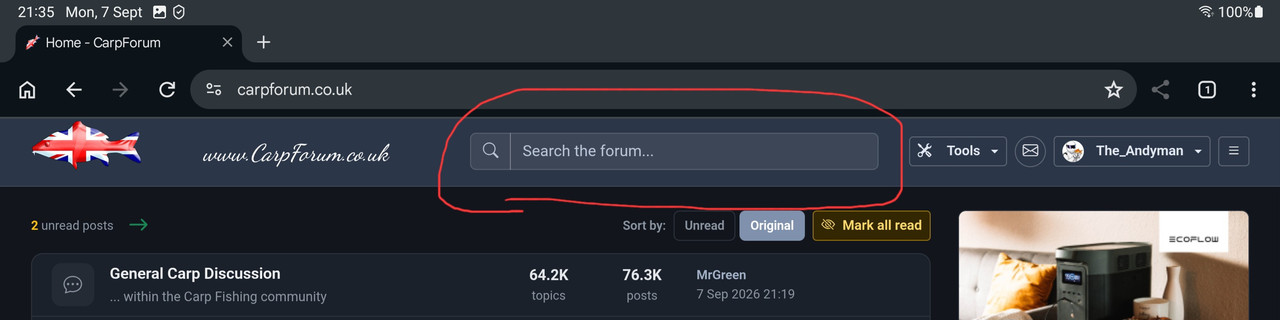
Edit
For clarity, the topic search box
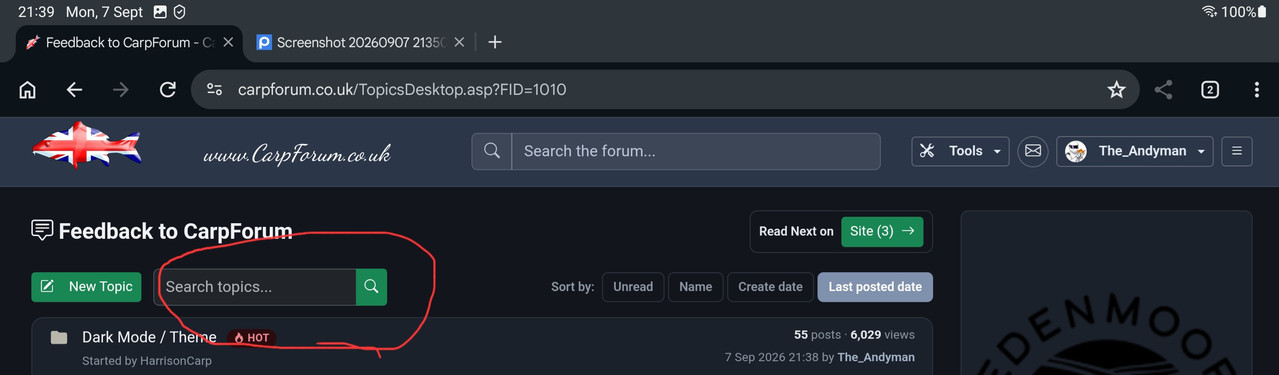
Do you not see this at the top of your page?
Edit
For clarity, the topic search box
In reply to Post #55
I think if you are surfing on a mobile phone that search box might not show. I'll add that to my snagging list and get it fixed.
I think if you are surfing on a mobile phone that search box might not show. I'll add that to my snagging list and get it fixed.
In reply to Post #51
Topic searching - easier to view if you expand the video to full screen once it's playing
Message searching - easier to view if you expand the video to full screen once it's playing
Topic searching - easier to view if you expand the video to full screen once it's playing
Message searching - easier to view if you expand the video to full screen once it's playing
In reply to Post #56
Ah yes good point, mobile doesn't show it in portrait or landscape, although shows fine on my android tablet in mobile and desktop site mode
Ah yes good point, mobile doesn't show it in portrait or landscape, although shows fine on my android tablet in mobile and desktop site mode
In reply to Post #51
I've added the search magnifying glass to the mobile version of the site.
You can click that and it will take you to the search page so you can start your sleuthing...
You'll need to choose your options before hitting search (e.g. change it to message mode)
I also put a link to the Search page in the Tools menu
I've added the search magnifying glass to the mobile version of the site.
You can click that and it will take you to the search page so you can start your sleuthing...
You'll need to choose your options before hitting search (e.g. change it to message mode)
I also put a link to the Search page in the Tools menu
In reply to Post #59
The new search page looks great on the mobile site along with all the options again, nicely done.
Tools doesn't show in portrait phone mode but the magnifying glass is there ok
The new search page looks great on the mobile site along with all the options again, nicely done.
Tools doesn't show in portrait phone mode but the magnifying glass is there ok