


Ain't a clue whose a mod as would have sent a PM.
However, I posted (or so I thought) an item in the classifieds but for some reason cannot see it.
Any thoughts as to why please?.
Thank you.
Tazi.
However, I posted (or so I thought) an item in the classifieds but for some reason cannot see it.
Any thoughts as to why please?.
Thank you.
Tazi.

In reply to Post #1
Is it camo?
(Sorry couldn't resist)
Is it camo?
(Sorry couldn't resist)
In reply to Post #2
Hee hee hee. Like eet.
Hee hee hee. Like eet.

In reply to Post #3
If it's the chub cloud 9 sleeping bag it's showing in the classifieds
If it's the chub cloud 9 sleeping bag it's showing in the classifieds

In reply to Post #1
This one?
Sale: For sale.
If you click 'Who's Online' you will see if there are any mods online, if you can't see any, none are online
This one?
Sale: For sale.
If you click 'Who's Online' you will see if there are any mods online, if you can't see any, none are online
Hi.
Yes that's the one. However, it's not visible when I go onto the classifieds.
Yes that's the one. However, it's not visible when I go onto the classifieds.
In reply to Post #5
Regards whose online.
Cannot see the post after clicking on classifieds.
Regards whose online.
Cannot see the post after clicking on classifieds.
In reply to Post #7
Definitely there mate
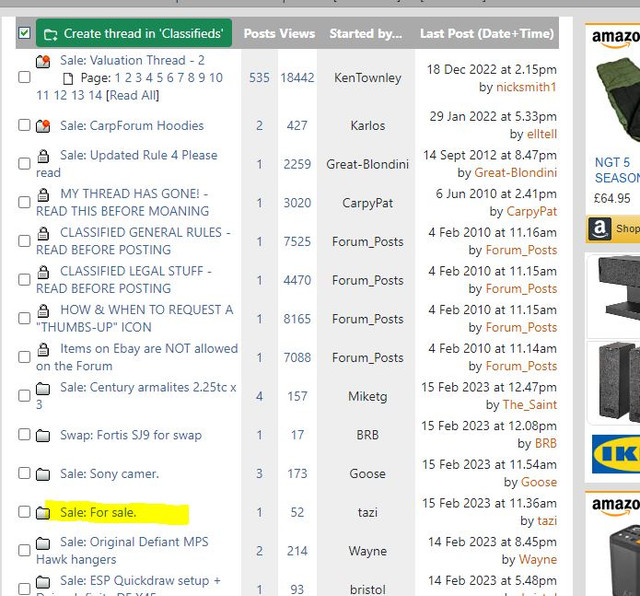
Definitely there mate

In reply to Post #7
It happens when you reply to a post too,when you go back on that page the thread goes missing until somebody else posts on it.It even happens if you look at a thread then go to a different page then go back,you then can't find the thread,I did wonder if it's just because I use my mobile and that causes issues
It happens when you reply to a post too,when you go back on that page the thread goes missing until somebody else posts on it.It even happens if you look at a thread then go to a different page then go back,you then can't find the thread,I did wonder if it's just because I use my mobile and that causes issues
I'll direct Karl to this thread chaps
Cheers lads, cheers Bradders for trying sort it.

In reply to Post #11
Following bradders suggestion I just replied on your thread, can you see it now?
Following bradders suggestion I just replied on your thread, can you see it now?

OK. I am quite surprised this is a question. It's how the site has worked for the last 20 years. I'll explain
Before I start, Thread and Topic and interchangeable phrases...I never did stick to one terminology.
On your Edit Profile page (link near top) you have a "Topic ordering" option
By default, this is set to "Unread topics first"
If you create a thread (and in doing so create the first post in that new thread) you have read it. You wrote it. It's not what the logic would consider to be a new/unread post for YOU.
It's new to everyone else though....so that thread (and it's new post) will go to the top of the Topic page for everyone else.
Once someone replies to your post (in that thread) the thread has a new post for YOU to read, so that thread comes to the top of the Topic page. That's when you see it.
The easiest way to check if you did create a new thread or not, and did it work, is to click View Profile at the top to go to YOUR profile page, then you will see your recent posts and it will be listed there
Hopefully that rushed explanation makes sense...not got time to proof read it, I am meant to be working
Before I start, Thread and Topic and interchangeable phrases...I never did stick to one terminology.
On your Edit Profile page (link near top) you have a "Topic ordering" option
By default, this is set to "Unread topics first"
If you create a thread (and in doing so create the first post in that new thread) you have read it. You wrote it. It's not what the logic would consider to be a new/unread post for YOU.
It's new to everyone else though....so that thread (and it's new post) will go to the top of the Topic page for everyone else.
Once someone replies to your post (in that thread) the thread has a new post for YOU to read, so that thread comes to the top of the Topic page. That's when you see it.
The easiest way to check if you did create a new thread or not, and did it work, is to click View Profile at the top to go to YOUR profile page, then you will see your recent posts and it will be listed there
Hopefully that rushed explanation makes sense...not got time to proof read it, I am meant to be working
In reply to Post #13
Makes perfect sense to me now you've pointed it out
Just checked and mine is most recent topics first
Makes perfect sense to me now you've pointed it out
Just checked and mine is most recent topics first
In reply to Post #12
Took a look (thanks it was visible to me) gave it the thumbs up, went back on it and now I can't see it.
Took a look (thanks it was visible to me) gave it the thumbs up, went back on it and now I can't see it.
In reply to Post #15
If you go into Edit profile this is how I have mine setup and I can see the thread whether anyone has posted or not.

As Karlos says, if you click on View Profile it will show your most recent posts there.
If you go into Edit profile this is how I have mine setup and I can see the thread whether anyone has posted or not.
As Karlos says, if you click on View Profile it will show your most recent posts there.
In reply to Post #16
Nice one thank you will give it a go.
Thank you, thank you all.
Nice one thank you will give it a go.
Thank you, thank you all.
In reply to Post #16
Nice one cheers as I see it now.
Nice one cheers as I see it now.
My thumb has gone now.... 

In reply to Post #19
Maybe your sitting on it
Maybe your sitting on it
In reply to Post #20

Bump.
Could you stitch my thumb back on please?.
Thank you.
Could you stitch my thumb back on please?.
Thank you.
Thumb stitched back on.
Thank you.
Thank you.

In reply to Post #23
posted in error
posted in error

This has been a study in 'how to raise the profile of your item that is for sale' like no other 
In reply to Post #25
Which item would that be, could you explain in full detail?.
Which item would that be, could you explain in full detail?.
Reading ALL pages