


In reply to Post #60
That whole tools area is a bit of a mess at the moment, do you get the hamburger menu (the 3 horizontal lines)
If so, everything in the Account dropdown and the Tools dropdown is repeated in there.
When I get to it, I will neaten that lot up so that mobile just has the burger menu to save space (with all links/options in there) and for users surfing on bigger screens the Tools / Account drop downs will be there (and no hamburger menu as there is right now)
I've just got emails working on the server...onwards and upwards.
What new features/functions do you guys want to see?
Or what old features/functions (that may have broken?) do you want to see back?
That whole tools area is a bit of a mess at the moment, do you get the hamburger menu (the 3 horizontal lines)
If so, everything in the Account dropdown and the Tools dropdown is repeated in there.
When I get to it, I will neaten that lot up so that mobile just has the burger menu to save space (with all links/options in there) and for users surfing on bigger screens the Tools / Account drop downs will be there (and no hamburger menu as there is right now)
I've just got emails working on the server...onwards and upwards.
What new features/functions do you guys want to see?
Or what old features/functions (that may have broken?) do you want to see back?

In reply to Post #61
Yep the burger box is there and search does show in there, not sure if I missed search there earlier or you've added it since lol, but it's plenty good enough.
Bug maybe, but when browsing through someones, my recent posts, the post width is not forced to wrap to fit the screen with the ads on the side, so my recent posts with the pics below stretch across behind the ads on the right. In this thread they are fit to the screen space so show fine
In case it helps..... ignore the red circling that is in the pic from earlier but look behind the ads on the right
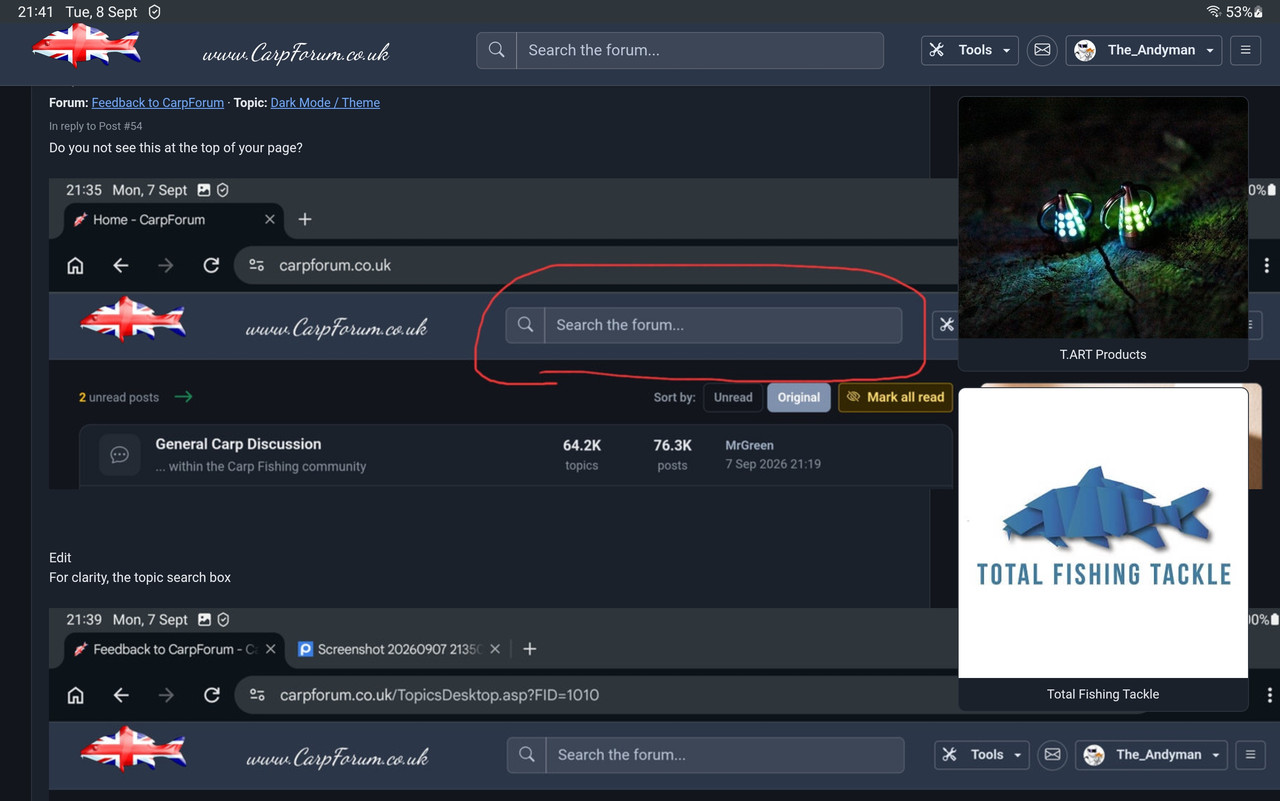
Edit - I changed the width on the earlier posts to 900 and it the fits with the ads to the right when looking through my last posts and still fits when just browsing this thread. I presume maybe you've got a scaling setting in the threads but maybe not set in the post history?
Edit 2 - The scaling of pics work fine on the new site but the example pic below for example (as I've left it for showing what I mean) does blow out on the old site too. I know we used to prefer a width=500 on the old site, so maybe we stick with adding a width so both sites stay looking ok?
Yep the burger box is there and search does show in there, not sure if I missed search there earlier or you've added it since lol, but it's plenty good enough.
Bug maybe, but when browsing through someones, my recent posts, the post width is not forced to wrap to fit the screen with the ads on the side, so my recent posts with the pics below stretch across behind the ads on the right. In this thread they are fit to the screen space so show fine
In case it helps..... ignore the red circling that is in the pic from earlier but look behind the ads on the right
Edit - I changed the width on the earlier posts to 900 and it the fits with the ads to the right when looking through my last posts and still fits when just browsing this thread. I presume maybe you've got a scaling setting in the threads but maybe not set in the post history?
Edit 2 - The scaling of pics work fine on the new site but the example pic below for example (as I've left it for showing what I mean) does blow out on the old site too. I know we used to prefer a width=500 on the old site, so maybe we stick with adding a width so both sites stay looking ok?

In reply to Post #61
Hi Karl, must admit I don’t like change and when I logged in the other day and was greeted by the new site, I instantly hated it and was inwardly seething. I saw that you mentioned the old site was still available, but I’ve resisted the temptation and stuck with the new one and now I’ve grown to love it!! Massive well done for your ongoing efforts 👏🏻.
Just one thing, my biggest bugbear, which has bothered me for a long while, is the “only 15 posts per page” thing. Really bugs me having to scroll down to post 15 just to get to the “read all pages” tab, then the whole thread reloads and sends you back to the top, at which point the “jump to new posts” tab actually works. If I hit the “jump to new posts” tab whilst on page 1, it just sends me to the bottom of page 1. I always have oldest posts (eg post 1) at top of page and not even sure if there is an option for newest posts to show first, not that I would want that, as I’m so used to viewing threads this way. I like to refresh myself with the original post on a thread before deciding if I want to read the new posts or not, if that makes sense?
Keep up the great work fella 👍🏻👍🏻
Hi Karl, must admit I don’t like change and when I logged in the other day and was greeted by the new site, I instantly hated it and was inwardly seething. I saw that you mentioned the old site was still available, but I’ve resisted the temptation and stuck with the new one and now I’ve grown to love it!! Massive well done for your ongoing efforts 👏🏻.
Just one thing, my biggest bugbear, which has bothered me for a long while, is the “only 15 posts per page” thing. Really bugs me having to scroll down to post 15 just to get to the “read all pages” tab, then the whole thread reloads and sends you back to the top, at which point the “jump to new posts” tab actually works. If I hit the “jump to new posts” tab whilst on page 1, it just sends me to the bottom of page 1. I always have oldest posts (eg post 1) at top of page and not even sure if there is an option for newest posts to show first, not that I would want that, as I’m so used to viewing threads this way. I like to refresh myself with the original post on a thread before deciding if I want to read the new posts or not, if that makes sense?
Keep up the great work fella 👍🏻👍🏻
In reply to Post #63
Top right click on your profile name
Settings
Post ordering
Newest posts first
This will show newest at the top if wanted..... with all the other changes, maybe now's a good time to swap over if wanted lol
However, I certainly get the idea of refreshing with the original post first
Top right click on your profile name
Settings
Post ordering
Newest posts first
This will show newest at the top if wanted..... with all the other changes, maybe now's a good time to swap over if wanted lol
However, I certainly get the idea of refreshing with the original post first
In reply to Post #62
Quote: the post width is not forced to wrap to fit the screen
Good spot. I programmed the Message page to try and confine images to the width available. This was in the hope to stop the image from bursting out of the message column.
I had not applied the same rules to the Profile page which you noticed.
I have applied it now though, so another bug fixed. Thanks🙏 👍
Quote: the post width is not forced to wrap to fit the screen
Good spot. I programmed the Message page to try and confine images to the width available. This was in the hope to stop the image from bursting out of the message column.
I had not applied the same rules to the Profile page which you noticed.
I have applied it now though, so another bug fixed. Thanks🙏 👍
In reply to Post #63
Quote: Just one thing, my biggest bugbear, which has bothered me for a long while, is the “only 15 posts per page” thing
I have added an option to the Settings page for you (well everyone!) mate.
It defaults to 15 (old setting) but you can up it to 25, 50, 100 or All.
This is now in place and I just gave it a test and it appears to work.
Let me know if you find any issues and I'll get them fixed
Right, back to fending off Asian hackers....I've been watching them trying to get into CarpForum for a few hours and failing. Few more bits of logging and restrictions to do and I can move onto something more exciting - like image uploads.
Quote: Just one thing, my biggest bugbear, which has bothered me for a long while, is the “only 15 posts per page” thing
I have added an option to the Settings page for you (well everyone!) mate.
It defaults to 15 (old setting) but you can up it to 25, 50, 100 or All.
This is now in place and I just gave it a test and it appears to work.
Let me know if you find any issues and I'll get them fixed
Right, back to fending off Asian hackers....I've been watching them trying to get into CarpForum for a few hours and failing. Few more bits of logging and restrictions to do and I can move onto something more exciting - like image uploads.
Nicely done again Karl, looking good on the widths and i like the message viewing number settings options too 👍👍

In reply to Post #66
It’s all looking/working great bud 👌
It’s all looking/working great bud 👌
In reply to Post #66
Excellent, cheers Karl 👍🏻👍🏻
Excellent, cheers Karl 👍🏻👍🏻
The number of posts per page, set to “All” is an absolute game changer for me, many thanks Karl 😃👍🏻
In reply to Post #70
You're welcome mate.
Thanks for letting me know about the inconvenience. I don't get time to test all settings on all devices etc etc so I rely on feedback so these things get found faster and I can fix them quicker 👍 😎
You're welcome mate.
Thanks for letting me know about the inconvenience. I don't get time to test all settings on all devices etc etc so I rely on feedback so these things get found faster and I can fix them quicker 👍 😎

Auto refresh would be good.
In reply to Post #72
That's a 1min job.
Which page(s)?
Homepage
Topics
WhosOnline
If I were to add it to the Messages page I think it would need to be conditional. If you had 20 new posts to read and the page refreshed halfway through reading it would be annoying
That's a 1min job.
Which page(s)?
Homepage
Topics
WhosOnline
If I were to add it to the Messages page I think it would need to be conditional. If you had 20 new posts to read and the page refreshed halfway through reading it would be annoying
In reply to Post #72
I wrote this last night.
It runs on the homepage (Forums.asp) and every 60 seconds it goes back to the server and asks if there's any new posts
Google will not allow a website to refresh a page which has Google Ads on it so so this has needed to be a Premium feature
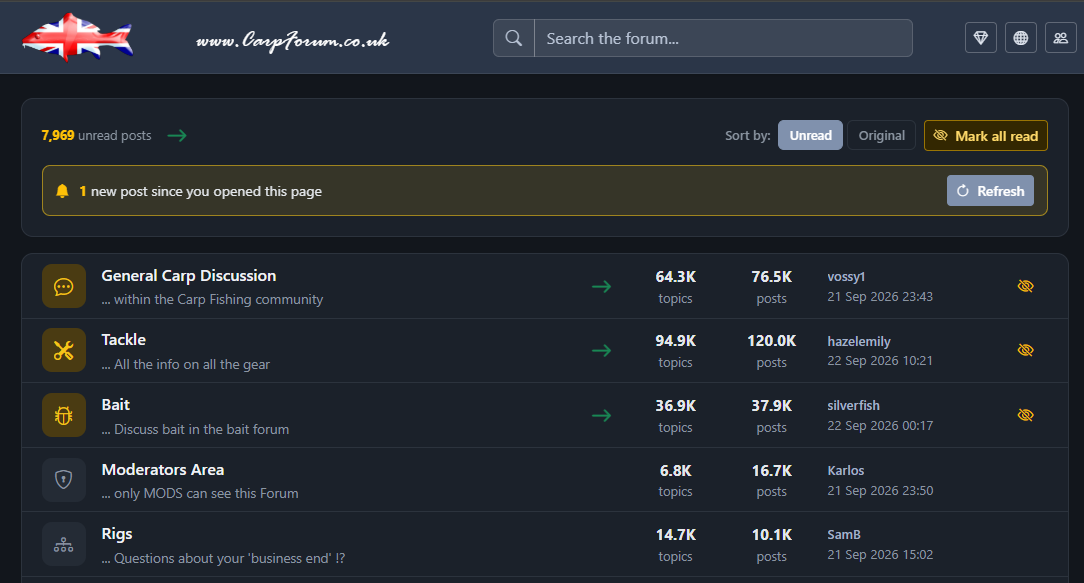
I wrote this last night.
It runs on the homepage (Forums.asp) and every 60 seconds it goes back to the server and asks if there's any new posts
Google will not allow a website to refresh a page which has Google Ads on it so so this has needed to be a Premium feature

On the old site when I replied to a post I just hit the home button to go back to the start.
Now I have to hit the back button (using my phone) to get back to the home page.
Is there easy fix for this ?
Now I have to hit the back button (using my phone) to get back to the home page.
Is there easy fix for this ?